Introduction
Healthcare SaaS platforms face a critical compliance challenge that most engineering teams discover too late: HIPAA audit logging is not automatically configured when you sign a cloud provider BAA. In 2024 alone, Montefiore Medical Center paid $4.75 million in penalties after an employee stole 12,517 patient records over six months - a breach that went undetected due to inadequate audit logging and review processes.
HIPAA audit logging and monitoring in SaaS is the systematic process by which platforms that create, receive, store, or transmit electronic protected health information (ePHI) record and review all activity involving that data to satisfy the HIPAA Security Rule's Audit Controls standard under 45 C.F.R. § 164.312(b).
For engineering and compliance teams at healthcare SaaS companies, this requirement carries extra weight. Cloud-native architectures distribute data access across tenants, APIs, and third-party integrations,making unauthorized access harder to detect without structured logging.
Most compliance resources treat HIPAA audit logging as a checkbox. This guide goes deeper: what the requirement actually demands, how it operates in SaaS environments, and where organizations most often get it wrong.
Key Takeaways
- HIPAA's Audit Controls standard requires any SaaS platform handling ePHI to log and review all user activity, access events, and system changes
- SaaS providers qualify as Business Associates and must meet the same audit logging obligations as covered entities, including executing a BAA with each healthcare customer
- Audit logs must capture user identity, timestamps, action type, resource accessed, access origin, and outcome , stored immutably, encrypted, and retained for at least six years
- Under the shared responsibility model, audit logging duties are split between the cloud infrastructure provider and the SaaS operator
- Organizations that skip or misconfigure audit logging face HIPAA penalties, loss of customer trust, and inability to reconstruct events during breach investigations
What Is HIPAA Audit Logging and Monitoring in SaaS?
HIPAA audit logging is the automated, continuous capture of records documenting who accessed ePHI, what action was performed, when it occurred, and from where. Monitoring is the active review and alerting process applied to those records to detect anomalies or violations.
Audit Logs vs. Audit Trails
The HHS Office for Civil Rights distinguishes between audit logs and audit trails in its 2017 Cybersecurity Newsletter. Here's how they differ in practice:
- Audit logs: Granular, raw event records generated at the system level each time ePHI is accessed or modified
- Audit trails: The reconstructed chronological narrative of a user's or system's activity, built by analyzing those logs over time
During a breach investigation, logs establish the factual record while audit trails tell the story of what happened. Both are required , one without the other leaves gaps that regulators and forensic teams will notice.
HIPAA Audit Logging vs. General Application Logging
HIPAA audit logging differs fundamentally from general application logging. General logs may capture performance metrics, error events, or system diagnostics. HIPAA audit logs are specifically scoped to ePHI touchpoints and must meet stricter requirements for integrity, access controls, retention, and reviewability.
Your standard application monitoring tools won't satisfy HIPAA requirements unless they're explicitly configured to capture the required data elements and protect log integrity.
Why HIPAA Requires Audit Logging in SaaS Environments
Regulatory Basis
Under 45 C.F.R. § 164.312(b), the HIPAA Security Rule requires covered entities and business associates to "implement hardware, software, and/or procedural mechanisms that record and examine activity in information systems that contain or use electronic protected health information." This is a Required standard, not Addressable,meaning it must be implemented.
SaaS providers handling PHI qualify as Business Associates under 45 C.F.R. § 160.103. The HHS 2016 Guidance on HIPAA & Cloud Computing explicitly confirms that Cloud Service Providers are directly liable for failing to safeguard ePHI in accordance with the Security Rule.
What Makes SaaS Different
Multi-tenant architectures create unique audit logging challenges. A single misconfigured access control or compromised credential can expose records across multiple healthcare customers simultaneously. Logs are the primary forensic mechanism to determine scope and attribution when incidents occur.
Without proper audit logging, organizations cannot answer basic breach investigation questions:
- Which patient records were accessed?
- Who accessed them?
- From what IP address or device?
- At what time?
- What actions were performed?
This inability to answer these questions triggers failures under both the Audit Controls standard and the Breach Notification Rule, which requires organizations to determine the scope of a breach within 60 days.
What Typically Goes Wrong
During enforcement actions and formal OCR audits, the absence of documented system activity evidence becomes a direct violation. Organizations without proper audit logging typically face three compounding failures:
- Cannot satisfy HHS Office for Civil Rights audit requests for documented system activity
- Cannot establish accurate breach notification timelines, jeopardizing the 60-day window
- Cannot detect insider threats or anomalous access patterns until damage is done
Addressable vs. Required in Practice
These enforcement patterns explain why the addressable/required distinction matters less in practice than it appears on paper. For SaaS platforms handling live ePHI across multiple clients, no documented alternative to audit logging exists that satisfies OCR scrutiny , which means it operates as a required control regardless of its technical classification.
The 2016-2017 HIPAA Audits Industry Report confirmed this gap directly: audited entities consistently "lacked the necessary focus on technical safeguards (access controls, audit controls, etc.) needed to properly protect the confidentiality, integrity, and availability of ePHI." Treat audit logging as non-negotiable from the start of your SaaS architecture , not a compliance checkbox added later.
How HIPAA Audit Logging Works in SaaS
HIPAA audit logging in SaaS operates as a continuous pipeline. Every user action or system event involving ePHI generates a structured log entry. Those entries flow to a centralized, secured repository, where designated personnel or automated systems review them for anomalies and document findings.
Essential Data Elements
Every HIPAA audit log entry must contain the following elements per NIST SP 800-53 Rev. 5 (Control AU-3):
- Unique user identifier , Who performed the action
- Precise UTC timestamp , When the event occurred
- Action type , Read, write, delete, modify, or other operation
- Resource or record accessed , Patient ID, file name, or specific data element
- Access origin , IP address, device identifier, or geographic location
- Outcome , Success or failure of the attempted action
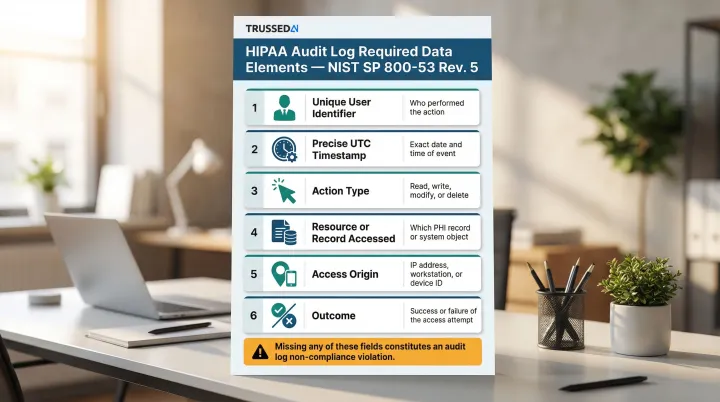
Missing any of these fields makes the log insufficient for compliance purposes. During OCR audits, incomplete log entries are treated as evidence of non-compliance.
Step 1: Define ePHI Touchpoints and Scope Logging Coverage
The first step is inventorying every layer of the SaaS stack where ePHI is created, accessed, or transmitted. This includes:
Application layer:
- User sessions and authentication events
- API calls from client applications
- Database queries retrieving patient data
Infrastructure layer:
- Cloud storage access (S3 buckets, Azure Blob, GCS)
- IAM role changes and privilege escalations
- Encryption setting modifications
Integration points:
- Third-party Solution (EHR systems, medical devices)
- Webhooks transmitting ePHI
- AI model interactions processing patient data
Coverage gaps are the leading cause of compliance failures. Logging only application events while ignoring infrastructure-level events like bucket policy changes or privileged admin access creates blind spots that auditors and attackers alike can exploit.
Step 2: Collect, Centralize, and Secure Log Data
Logs from all covered sources must be forwarded to a centralized SIEM or log management platform in real time using standardized formats such as Syslog or CEF. Centralization connects events across systems and eliminates fragmented evidence during investigations.
The log repository itself must be secured against tampering, unauthorized access, and data loss:
- Store logs with AES-256 encryption at rest; transmit using TLS 1.2 or higher (NIST SP 800-52 Rev. 2 requires TLS 1.3 support as of January 1, 2024)
- Enforce write-once read-many (WORM) storage to prevent tampering and satisfy 45 C.F.R. § 164.312(c)(1) integrity requirements
- Apply role-based access controls (RBAC) so even system administrators cannot alter or delete log records
- Validate log integrity using SHA-256 checksums or cryptographic signatures to confirm records haven't been modified
AWS recommends using S3 Object Lock (WORM model) to protect CloudTrail logs. While HIPAA doesn't explicitly mandate "WORM" by name, the integrity protection requirement under 45 C.F.R. § 164.312(c)(1) makes immutability the de facto standard.
Step 3: Monitor, Review, Alert, and Retain
The ongoing monitoring layer includes:
Baseline establishment:
- Document normal access patterns for each user role
- Identify typical query volumes and data access frequencies
- Establish geographic and temporal access norms
Automated real-time alerts for high-risk events:
- Mass PHI downloads exceeding normal thresholds
- Off-hours access from unknown devices or locations
- Repeated failed login attempts
- Privilege escalations or role changes
- Changes to encryption settings or IAM policies
Tiered review cadences:
- Daily review of critical security alerts
- Weekly review of privileged access events
- Monthly configuration audits
- Quarterly comprehensive access pattern analysis
Retention requirements:
HIPAA documentation standards under 45 C.F.R. § 164.316(b)(2)(i) require a minimum six-year retention period. However, state laws frequently override this baseline:
- California: 22 CCR § 72543 requires 7-year minimum retention
- Texas: 22 TAC § 163.2 mandates 7-year minimum retention
- New York: 6 years for adults, but until age 21 for minors
To meet both federal and state requirements, SaaS platforms should implement tiered storage with automated lifecycle policies:
- Hot storage: 30-90 days for active investigation and real-time queries
- Warm storage: Intermediate access for periodic reviews
- Cold/archive storage: Long-term compliance retention with retrieval SLAs
Logs must remain retrievable and verifiable throughout the full retention window.
Key Factors That Affect HIPAA Audit Logging in SaaS
Shared Responsibility Model
Cloud infrastructure providers secure the underlying hardware and provide native logging tools, but SaaS operators are responsible for enabling, configuring, and validating those tools for ePHI coverage.
Critical reality: Simply signing a cloud provider BAA does not activate compliant logging.
| Cloud Provider | Default Logging State | Customer Responsibility |
|---|---|---|
| AWS | CloudTrail trails do not log data events by default | Must manually enable data events for S3 GetObject, PutObject operations |
| Google Cloud | Data Access audit logs disabled by default (except BigQuery) | Must explicitly enable Data Access logs in console or API |
| Microsoft Azure | Resource logs not collected by default | Must create diagnostic settings to collect resource logs |
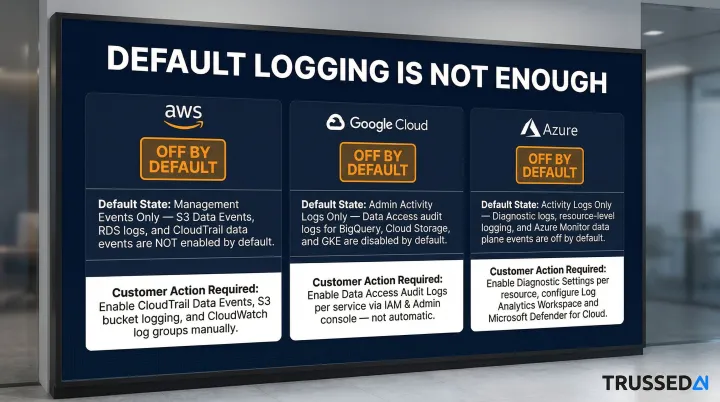
The SaaS team must explicitly configure data event logging, log routing, and retention policies for every service that touches PHI. Management events (control plane operations) are often enabled by default, but data events (actual ePHI access) require manual configuration.
That configuration gap extends beyond the infrastructure layer , it becomes even more complex as AI systems enter the stack.
AI and Automated Agent Interactions
As SaaS platforms embed LLMs, AI copilots, and agentic workflows into healthcare applications, these systems query and process ePHI in ways that traditional user-activity logging wasn't designed to capture.
The 2024-2025 HIPAA Security Rule Notice of Proposed Rulemaking (NPRM) explicitly addresses this gap. It states that "ePHI, including ePHI in AI training data, prediction models, and algorithm data that is maintained by a regulated entity for covered functions is protected by the HIPAA Rules." The Department also expects AI software that creates, receives, maintains, or transmits ePHI to appear in the technology asset inventory , feeding directly into the regulated entity's risk analysis.
AI model calls, prompt inputs, and generated outputs involving patient data must be logged with the same rigor as human user actions. Each AI interaction should generate an audit record capturing:
- The model version used
- The prompt or query submitted
- The response generated
- Policy evaluation results
- Timestamp and requesting user or system
Platforms like Trussed AI address this gap by treating every governed AI interaction as a loggable compliance event, automatically generating audit evidence as a byproduct of real-time policy enforcement.
Scale and Multi-Tenancy
High-volume SaaS environments can generate millions of log events daily, creating challenges in:
- Storage cost management
- Retrieval performance
- Signal-to-noise ratio in alerting
Without structured schemas and automated triage, log review becomes impractical and anomalies go undetected. Organizations must implement filtering and alerting rules so anomalous events stand out from routine access patterns.
Legacy and Third-Party Integrations
Many healthcare SaaS platforms connect to EHR systems, medical devices, or third-party analytics tools with inconsistent or proprietary logging formats. These integration points represent coverage gaps where ePHI may be accessed without a corresponding audit record.
For each integration, organizations should assess:
- Whether the system generates structured logs for ePHI access events
- Whether those logs are routed to a central store with consistent retention
- What compensating controls are needed where native logging falls short
Common Issues and Misconceptions About HIPAA Audit Logging in SaaS
"Logging Is On by Default"
Many SaaS teams assume that enabling a cloud service automatically activates HIPAA-compliant logging. In practice, cloud providers require explicit configuration of data-level events, not just management events.
AWS CloudTrail example: By default, trails log management events (control plane operations like creating an S3 bucket) but not data events (data plane operations like accessing objects within that bucket). The CloudTrail Event history does not record data events. To log S3 data events, users must edit the trail and explicitly add S3 as a data event source.
This configuration gap is the single most common technical violation during OCR audits of cloud-based healthcare systems.
Treating Log Collection as the Finish Line
Organizations frequently invest in log collection infrastructure but fail to implement the monitoring, alerting, and regular review procedures that HIPAA also requires under 45 C.F.R. § 164.308(a)(1)(ii)(D).
During OCR audits, demonstrating that logs exist is insufficient. Organizations must also show:
- Documented evidence of regular log reviews
- Alert triage procedures and outcomes
- Corrective actions taken in response to anomalies
- Assignment of review responsibilities to specific personnel
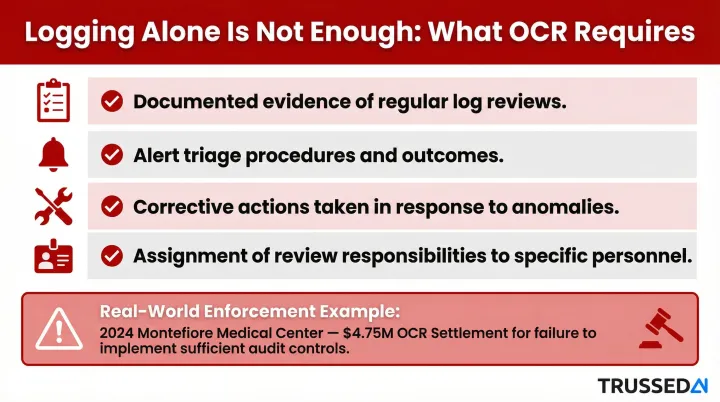
Recent enforcement actions heavily target this gap. The 2024 Montefiore Medical Center settlement ($4.75M) explicitly cited failure to implement procedures to regularly review records of information system activity.
Confusion Between SaaS Provider and Customer Obligations
Some SaaS vendors assume their healthcare customers are solely responsible for audit logging because the customers are the covered entities. That assumption is wrong , and costly.
As Business Associates, SaaS providers have independent logging obligations under the Security Rule. They must produce their own audit records showing how they managed ePHI on the customer's behalf. The BAA must explicitly address which party maintains which logs.
Both parties carry distinct responsibilities:
- SaaS provider: Must log its own system activity and all access to ePHI within the platform
- Healthcare customer: Must log user activity within the SaaS application
When the BAA leaves this split undefined, both parties risk being unable to demonstrate compliance during an OCR audit , regardless of how much either side actually logged.
Frequently Asked Questions
Does HIPAA require audit logging and monitoring of privileged access to PHI in SaaS applications?
Yes, HIPAA's Audit Controls standard requires monitoring of all activity involving ePHI. Privileged access,including administrative accounts, break-glass roles, and elevated API credentials,must be logged with the same rigor as standard user access. Privileged accounts carry the highest risk of unauthorized exposure and warrant additional scrutiny.
How do you implement HIPAA audit logging and monitoring in SaaS applications?
Inventory all ePHI touchpoints in your SaaS stack, enable and configure data-event logging at each layer (application, infrastructure, integrations), route logs to a centralized and secured SIEM with WORM storage, establish automated alerts for high-risk events, assign regular review cadences, and document all configurations and review activities for audit readiness.
Is SaaS HIPAA compliant?
SaaS platforms are not HIPAA compliant by default but can be configured to comply. Vendors handling ePHI qualify as Business Associates and must implement the Security Rule's administrative, technical, and physical safeguards , audit logging included. A signed BAA with each covered entity customer is required before any PHI is processed.
What is the difference between HIPAA audit logs and audit trails?
Audit logs are the raw event records generated each time ePHI is accessed or modified. An audit trail is the reconstructed chronological record built by connecting those entries to document a user's or system's activity. Logs are the data source; audit trails enable investigation and compliance reporting.
How long must HIPAA audit logs be retained in a SaaS environment?
HIPAA does not specify a retention period for audit logs, but the six-year documentation minimum under 45 C.F.R. § 164.316(b)(2)(i) is the widely accepted baseline. State laws (California and Texas both require seven years) and contractual obligations may extend that requirement.
What are the penalties for failing to maintain HIPAA-compliant audit logs?
Inadequate audit logging is a recurring factor in OCR enforcement actions, with penalties ranging from $141 to $2,134,831 per violation depending on culpability. In 2024, Montefiore Medical Center paid $4.75 million for failing to implement audit controls; Excellus Health Plan settled for $5.1 million in 2021 for similar gaps. Both cases also resulted in mandatory corrective action plans and heightened regulatory oversight.