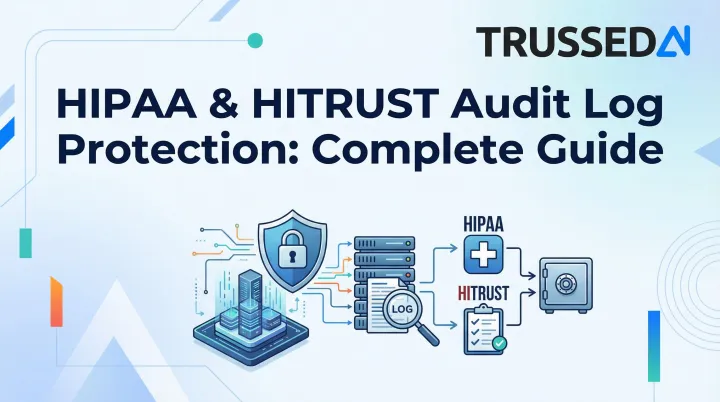
This guide covers the specific legal requirements HIPAA imposes on audit logs, what HITRUST adds, what must actually be captured, how long to retain logs, and best practices for protecting them in healthcare environments where AI systems increasingly handle protected health information.
Key Takeaways
- HIPAA's Security Rule (§164.312(b)) makes audit controls a required standard for any system that stores or processes ePHI
- HITRUST CSF maps to HIPAA through Control 09.aa, adding prescriptive specs on what to log, log protection, and review frequency
- Audit logs must capture user identity, timestamps, action performed, and affected data: access, modification, deletion, and failed attempts
- HIPAA requires documentation retained for at least 6 years from creation or last effective date
- Automated, tamper-evident log generation is what makes audit trails defensible during HIPAA or HITRUST review
What HIPAA Requires for Audit Logs
The Legal Mandate: Required, Not Addressable
HIPAA's Security Rule under §164.312(b) establishes "Audit Controls" as a required implementation specification - meaning covered entities and business associates have no flexibility to opt out. Unlike "addressable" specifications where alternatives are permitted, audit controls are mandatory.
Who must comply:
- All HIPAA covered entities (health plans, healthcare clearinghouses, healthcare providers)
- Their business associates
- Any organization that creates, receives, maintains, or transmits ePHI
What §164.312(b) requires: hardware, software, and/or procedural mechanisms that record and examine activity in information systems containing or using ePHI. HIPAA does not prescribe exactly what to log, leaving organizations flexibility,but also full responsibility,to define appropriate scope based on their risk analysis.
The Complementary Review Requirement
§164.308(a)(1)(ii)(D) establishes the Information System Activity Review requirement: organizations must regularly review records of information system activity, including audit logs, access reports, and security incident tracking. Collecting logs isn't enough,you must demonstrate documented, consistent review.
That obligation to review becomes consequential fast once regulators get involved.
Enforcement Consequences
During OCR investigations, auditors request audit log evidence to establish timelines of access or data exposure. The OCR Audit Protocol explicitly directs auditors to obtain documentation demonstrating that information system activities are reviewed in a timely manner.
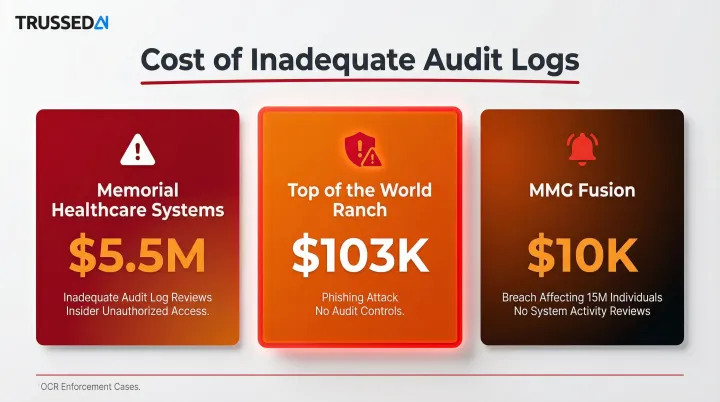
Recent enforcement actions highlight the cost of inadequate logs:
- Memorial Healthcare Systems: $5.5 million settlement,lack of access controls and regular audit log reviews allowed insiders to cover their tracks
- Top of the World Ranch Treatment Center: $103,000 settlement after phishing attack,OCR mandated implementation of audit controls
- MMG Fusion: $10,000 settlement following breach affecting 15 million individuals,required to implement audit controls and regular system activity reviews
What HITRUST CSF Adds to Audit Log Requirements
The Key Distinction: What vs. How
While HIPAA sets a general mandate for audit controls, HITRUST CSF (specifically Control 09.aa, formerly 10.k, "Audit Logging") provides detailed implementation requirements that tell organizations exactly how to fulfill that mandate.
HITRUST Control 09.aa Specifications
HITRUST goes beyond HIPAA's general requirement by specifying:
- Logs user logins, privileged operations, failed access attempts, data modifications, file changes, and security policy modifications
- Requires consistent log fields: unique user ID, data subject ID, function performed, date/time, success/failure status, files and accounts involved
- Mandates tamper protection for logging systems via file-integrity monitoring or change-detection software
- Requires automated tools for centralized monitoring and cross-environment log analysis
- Enforces UTC time synchronization within 30 seconds across all systems
HITRUST's Three Assessment Levels
HITRUST's tiered assessment structure applies different rigor levels to audit logging:
e1 (Essentials, 1-year):
- Covers 44 foundational cybersecurity controls
- Basic audit capability for small organizations
- Lower-risk environments
i1 (Implemented, 1-year):
- 182 controls mapping directly to NIST SP 800-171 and HIPAA Security Rule
- Requires automated tools for monitoring system events
- Appropriate for most healthcare organizations handling ePHI
r2 (Risk-based, 2-year):
- Most comprehensive assessment with thousands of tailorable controls
- Advanced monitoring including privileged user activity tracking
- Risk-based log analysis requirements
- Strict time synchronization (UTC within 30 seconds)
- Appropriate for high-risk healthcare environments
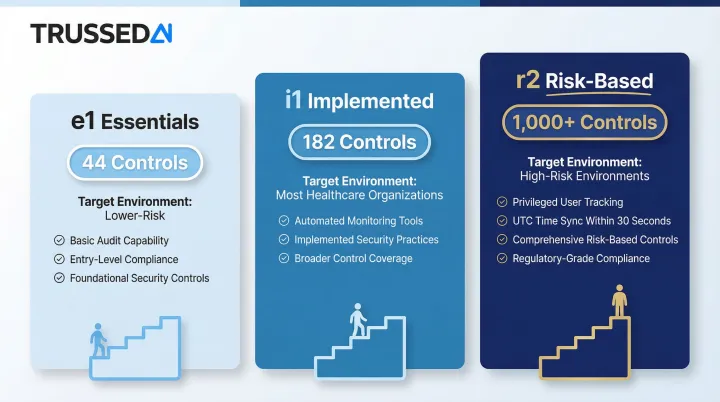
Each tier sets a progressively higher bar for audit logging maturity , and which level an organization pursues often depends on what its business partners require.
HITRUST Certification Value in Business Relationships
At the i1 or r2 level, HITRUST certification gives organizations a verifiable, third-party-validated demonstration of HIPAA audit control compliance , something a self-assessment alone cannot provide. Healthcare partners increasingly require this certification contractually in business associate agreements.
Important Boundary: HITRUST ≠ HIPAA Compliance
HITRUST makes clear that certification does not equal HIPAA compliance. It demonstrates security maturity , it does not satisfy legal obligations under HIPAA. OCR enforces HIPAA regardless of an organization's HITRUST status.
What Your Audit Logs Must Actually Capture
Core User Activity Events
Every HIPAA-compliant audit log must capture:
- Successful and failed login attempts
- User identity and role
- Session start and end times
- Any access to records containing ePHI
Data-Level Events
Capture these actions for all ePHI records:
- Creation of new records
- Modification of existing records
- Viewing or accessing records
- Copying records
- Deletion of records
Each entry must record the action type, the specific record affected, and the responsible user , building an immutable chain of custody for sensitive health information.
System-Level and Administrative Events
Critical for detecting insider threats and unauthorized privilege abuse:
- Configuration changes to systems handling ePHI
- Privilege escalations
- New user account creation or deactivation
- Changes to access control policies
- Administrative commands such as
suorRUNAS
AI Systems and Automated Workflows
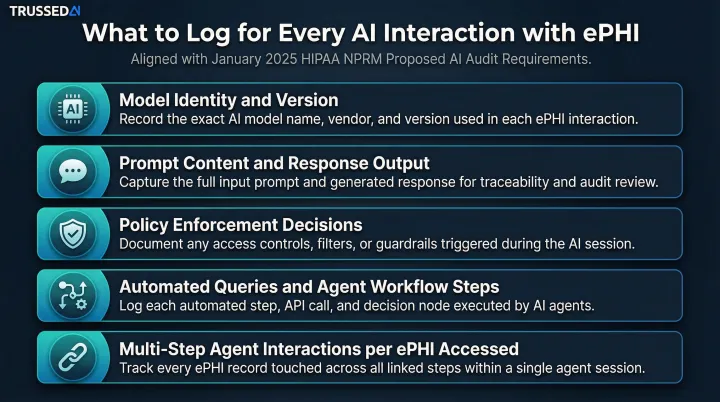
As organizations deploy AI models, agents, and automated workflows that process or retrieve ePHI, each model interaction is an auditable event. The January 2025 HIPAA Security Rule NPRM explicitly states that AI tools interacting with ePHI must be included in risk analyses and their activities monitored and recorded.
For each AI interaction, logs must capture:
- Model identity and version accessed
- Prompt content submitted and response outputs generated
- Policy enforcement decisions applied
- Automated queries and agent-driven workflow steps
- Multi-step agent interactions where each step may access different ePHI
Contextual Detail for Forensic Investigation
HITRUST's Control 09.aa sets a clear standard: logs must contain enough detail to fully reconstruct any event after the fact. That means capturing the surrounding context an investigator would need to answer what happened, where, and how:
- IP address
- Device identifier
- Application name
- Source and destination addresses
- Error codes
- Service names
HIPAA Audit Log Retention: How Long Must You Keep Logs?
The 6-Year Documentation Rule
HIPAA's documentation retention requirement under §164.316(b)(2) mandates that documentation,including policies, procedures, and records that demonstrate compliance,be retained for at least 6 years from the date of creation or the date when the document was last in effect, whichever is later.
Audit logs fall under this documentation umbrella. Treat them as compliance records and apply the 6-year minimum , HIPAA doesn't carve out a separate log retention period, so the general documentation rule governs.
State Laws May Impose Longer Retention
The 6-year federal floor is a starting point, not a ceiling. Several states impose stricter requirements that supersede HIPAA:
| State | Retention Requirement |
|---|---|
| California | 7 years after last date of service |
| New York | 6 years from discharge/last visit, or 3 years after minor reaches age 18, whichever is longer |
| Texas | 7 years for adults; until age 21 or 7 years for minors, whichever is longer |
These state laws target medical records directly, but most organizations align their audit log retention schedules to match , forensic data needs to be available for the same window a patient record could be disputed.
Tiered Storage Strategy
HITRUST CSF r2 assessments and security best practice frameworks recommend organizations retain logs beyond the minimum and implement tiered storage:
- Hot storage: Recent logs under active review (90 days to 1 year), accessible for incident response and audits
- Warm storage: Logs from the prior 1–3 years, retained at lower cost but retrievable within hours
- Cold archival: Logs held to satisfy the 6-year compliance floor, optimized for cost over access speed
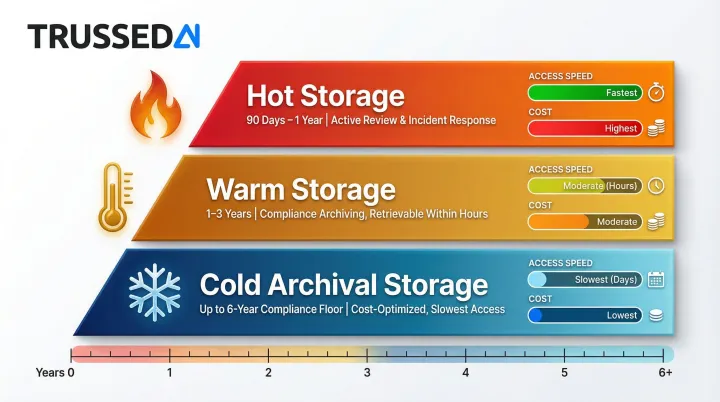
This approach balances operational access needs with cost-effective long-term retention.
Best Practices for Protecting Audit Logs in Healthcare Environments
Tamper-Evident Storage Mechanisms
Audit logs are only useful as compliance evidence if they are tamper-evident. Organizations should implement:
Write-once or append-only logging:
- Users have append-only privileges with no read access if possible
- Prevents modification or deletion of existing log entries
Cryptographic hashing:
- Use SHA-256 or stronger hashing algorithms
- Detect unauthorized modification through integrity checking
- NIST SP 800-92 recommends cryptographic hashing for log file integrity
Separation of duties:
- Administrators of systems being logged cannot also modify those logs
- Security personnel responsible for access controls do not perform audit functions for those controls
- NIST SP 800-171 requires dividing system support functions among different individuals
Automating Audit Trail Generation for AI-Era Healthcare Systems
Healthcare organizations running dozens of applications, cloud Solution, and increasingly AI-powered tools cannot maintain coherent audit trails through manual processes. Centralized log aggregation (SIEM or equivalent) is essential for both real-time monitoring and audit readiness.
The core problem with AI workloads is retrofitting. Traditional logging approaches require bolting on audit capabilities after deployment, but many AI platforms don't generate audit trails by default. Every model interaction, prompt, and response that touches ePHI must be captured from the start.
Platforms like Trussed AI address this for AI-specific workloads by generating complete audit trails as a built-in byproduct of every governed AI interaction. This includes:
- Model access and version
- Prompt content
- Response outputs
- Policy enforcement decisions
- Full chain of custody from prompt to model to output to action
Healthcare organizations deploying AI get tamper-resistant audit evidence generated automatically at every interaction , no retrofitting required.
Regular Review Practice Requirement
Generating logs is only half the obligation. HIPAA §164.308 requires organizations to demonstrate they review logs on a documented, consistent schedule , and that evidence must hold up during OCR audits.
A defensible log review program includes:
- Conduct weekly or daily reviews depending on system risk level
- Assign designated security personnel or compliance officers as responsible reviewers
- Define escalation procedures with clear steps for investigating anomalies
- Maintain records of each review, findings, and actions taken
- Configure SIEM alerts for suspicious activity that requires immediate investigation
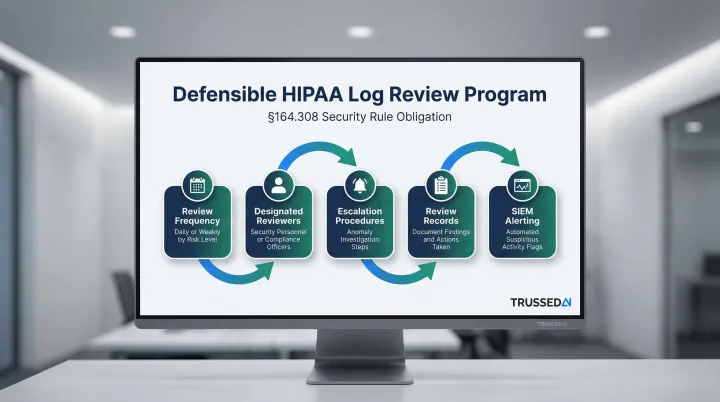
Organizations should document review schedules, maintain records of completed reviews, and demonstrate consistent follow-through during OCR audits.
Frequently Asked Questions
Does HIPAA require audit logs?
Yes, HIPAA's Security Rule under §164.312(b) makes audit controls a required standard,not addressable,for all covered entities and business associates. Organizations must implement hardware, software, or procedural mechanisms that record and examine ePHI system activity.
How long do you need to keep logs for HIPAA?
HIPAA's documentation retention rule under §164.316(b)(2) requires records kept for at least 6 years from creation or last effective date. Audit logs fall under this requirement, and some state laws extend retention to 7–10 years.
Does HITRUST cover HIPAA?
HITRUST CSF incorporates HIPAA requirements (particularly at the i1 and r2 assessment levels), so certification demonstrates a structured compliance approach. It is not a legal substitute, though: OCR enforces HIPAA regardless of HITRUST status.
What should be included in a HIPAA audit log?
Core elements include user identity, timestamp, action performed (access, create, modify, delete), system or record affected, and,for failed events,the nature of the failure. HITRUST CSF Control 09.aa adds requirements for sufficient contextual detail (IP address, device identifier, application name) to support forensic reconstruction.
What happens if audit logs are missing during a HIPAA investigation?
Missing or inadequate audit logs during an OCR investigation can result in the inability to demonstrate compliance, increased penalty exposure, and difficulty rebutting allegations of a broader breach. The absence of logs is itself treated as a compliance deficiency, as Memorial Healthcare Systems discovered in their $5.5 million settlement.
Do audit log requirements apply to AI systems used in healthcare?
Yes. Any AI system that accesses, processes, or returns ePHI falls under HIPAA's audit controls requirement. The January 2025 HIPAA Security Rule NPRM explicitly requires AI tools interacting with ePHI to be included in risk analyses and monitored, with AI model interactions and agent-driven workflows logged at the same standard as traditional application access.